Research checked 17 September 2026.
Illustrative business scenario. The company, workforce and events are assumptions. No customer deployment, testimonial, measured saving or breach reduction is claimed.
An employee can expose customer information while doing exactly what the business asked them to do: work faster. A proposal needs polishing. A support ticket needs summarising. A spreadsheet needs explaining. An AI assistant offers an immediate answer, and the employee supplies the context that makes that answer useful.
That context may include names, commercial terms, personal information or credentials. The business therefore needs a decision about what can leave its environment, backed by controls at the point where information is shared.
This is the business case for Acronis GenAI Protection. Its documented capabilities address AI usage visibility, sensitive prompt data and harmful prompts. Used with an approved-use policy and a tested deployment, it can make everyday AI use more accountable. [1]
The AI market is larger than the approved software list
A research workbook prepared for Soteria Cloud catalogues 300 AI offerings across 28 categories, from general assistants and coding tools to meeting services and workflow platforms. It is a broad desk-research map, not a complete market census, adoption survey or hands-on security test.
The useful lesson is organisational. AI can enter a business through several departments and purchasing routes. A licence register alone will miss employees using personal accounts, a new browser tool or an AI feature inside software the business already owns.
ChatGPT, Claude, Gemini and Microsoft Copilot are familiar examples of AI-assisted work. Naming an application does not establish that a particular account, integration or access route is approved. It also does not establish coverage by a security product. The decision has to include the service, the account, the task and the data.
We recommend maintaining an AI use register with five fields: business owner, approved purpose, permitted data, access route and review date. This turns an argument about whether AI is safe into decisions that a team can actually follow.
Shadow AI begins with an ordinary business need
Shadow AI is the use of AI tools or features outside the organisation's approved governance and oversight. A service can be well known and still be shadow AI within a particular business.
Consider the following illustrative case. A 60-person South African professional-services business uses AI to help prepare proposals, explain support issues and develop marketing material. Its staff work on managed Windows laptops, while some also use personal devices. The company, size and events are scenario assumptions; they do not describe a Soteria customer or a measured deployment.
A sales employee wants to turn working notes into a polished proposal. The notes contain customer contacts, negotiated pricing and internal comments. The proposed action is simple: paste them into a chatbot and ask for clearer wording.
The employee's intention is reasonable. The data-sharing decision still needs authorisation. Without an approved route, the business has no reliable basis for deciding whether that account and service may receive the information.
Now add a technician pasting a diagnostic extract that contains a token, or a manager asking an AI tool to summarise an employee matter. These are different workflows, but each moves information across a boundary the business needs to govern. OWASP identifies sensitive information disclosure as a distinct risk in large language model applications. [2]
Why an AI policy needs technical enforcement
A policy can explain what staff should do. It cannot, by itself, stop a prohibited submission. People make mistakes, work under pressure and misunderstand what counts as confidential.
Training remains necessary. So does a practical alternative: approved tools, clear examples of permitted information and an exception route that does not leave employees waiting indefinitely. If the business says no to one workflow, it should explain how to complete the work safely.
For the illustrative business, this means allowing useful drafting with public or properly sanitised material, while preventing protected information from being submitted through prohibited routes. Acronis's GenAI DLP demonstration documents policy configuration, blocking of unauthorised transfers and review of blocked attempts in the event log. [3]
The result to pursue is a controlled decision before submission. Once information has reached an external service, a subsequent policy change cannot retroactively prevent that transfer.
Where Acronis GenAI Protection fits
The documented control set gives an MSP a practical basis for an ongoing service. Its value depends on correct configuration, supported channels and someone taking responsibility for the evidence.
Understand usage. Monitoring and reporting help reveal which AI services are being used and where review is needed. Reports should inform decisions about approved work, rather than become a count of activity with no owner. [4]
Control application access. Acronis's July 2026 release adds policies that allow specified applications and domains, or block specified ones. The release describes web, desktop and SaaS application access scenarios. This is an access-control capability; it is not proof that every prompt or file in every one of those channels is inspected. [5]
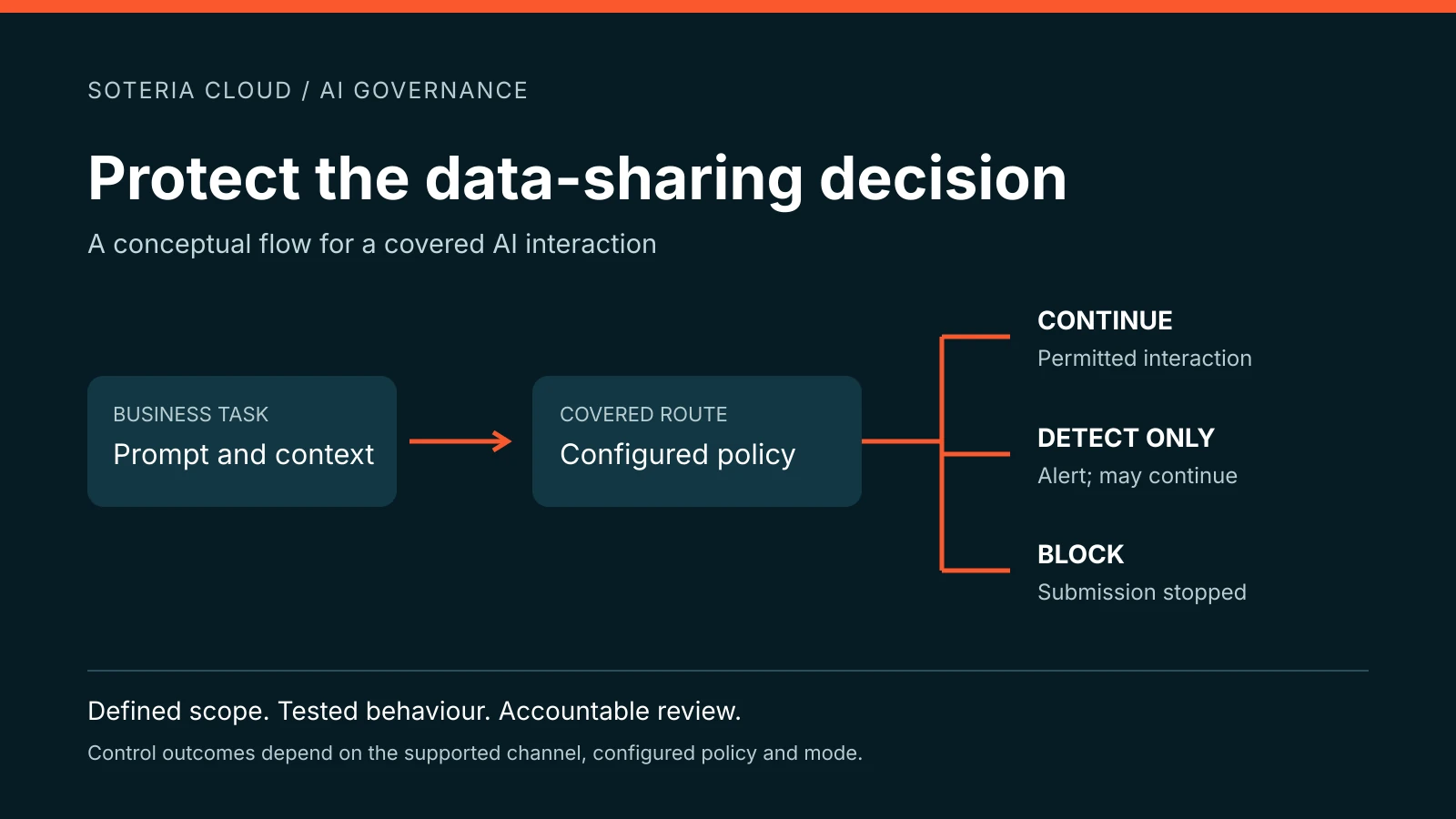
Apply prompt controls. The GenAI Protection data sheet describes sensitive-data classification and harmful-prompt detection, with detect-only and block modes. A pilot should establish how the selected rules behave on the business's actual work before enforcement is widened. [6]
Make investigation accountable. July's reporting changes associate GenAI activity with the logged-in account, adding user context to device information. That can support investigation; it should not be treated as conclusive proof of who was physically using a shared or compromised account. [5]
For the proposal scenario, a prohibited prompt containing information recognised by the configured policy should be blocked on a covered route. The employee can then remove the sensitive material or use the approved exception process. This is an expected test outcome, not a claim that a customer deployment achieved it.
For the broader product introduction, read our overview of Acronis GenAI Protection.
The protection boundary matters as much as the feature list
Acronis positions GenAI prompt protection around browser-based interactions and describes its broader DLP service for additional local and network channels. [1] The July access-control expansion should be read alongside that distinction.
Before deployment, map each workflow to the exact operating system, browser or application, agent version, AI destination, licence and policy. Confirm availability in the target tenant. Test text prompts separately from file uploads, images, voice, native applications, browser extensions and API calls. An allow/block result does not demonstrate content inspection.
The launch release documented support for 64-bit Windows 11 and Windows 10 version 1809 or newer. Treat that as a dated product baseline, not confirmation that every current platform or configuration is supported. Validate the present support matrix with your provider. [7]
The 300 entries in our research workbook are not an Acronis compatibility list. A security control also does not repair vulnerabilities inside an AI provider's infrastructure, certify the accuracy of an answer or make an autonomous agent safe to act on production systems.
This is why a deployment needs a coverage record. List what was tested, what remains outside scope and who owns the next control. A visible gap can be managed. An assumed capability cannot be relied on.
Prompt injection needs a layered response
Prompt injection involves instructions that steer a model away from its intended behaviour. Those instructions may arrive directly in a prompt or indirectly through material such as a retrieved page or document. OWASP recommends measures including restricted privileges, input and output controls, and human approval for consequential actions. [8]
Acronis describes detection and blocking of harmful prompts. [6] That provides a relevant control for supported interactions, but it should not be represented as a universal defence against every indirect injection or an end-to-end security system for custom agents.
If an AI workflow can change customer records, run commands or send messages, review those permissions separately. Require approval for consequential actions and test how untrusted content is handled. Access to a powerful model should never silently become authority to make a business decision.
A four-week pilot that produces useful evidence
For the illustrative business, we recommend a four-week pilot. This is a proposed operating plan, not a vendor deployment guarantee.
During the first week, identify the business owners and build the AI use register. Confirm licensing and deployment prerequisites. Tell staff what will be monitored, why, who can see the records and how long evidence will be retained.
In week two, establish a limited detect-only baseline using the documented mode. [6] Sensitive work still needs an approved route during observation: detect-only should not be mistaken for blocking. Define an escalation path for suspicious activity and restrict access to the resulting records.
In week three, test the agreed policies using synthetic data. Check prohibited and permitted prompts, intended application blocks, user attribution and exception handling. Include a non-sensitive version of the proposal task so the test assesses whether useful work can continue.
In week four, enable agreed enforcement for the workflows that passed. Retest after changes and retain the evidence with the policy version and date. Keep uncovered devices and routes in a separate action list with named owners.
Measure coverage of the defined pilot population, correct blocking of prohibited test submissions, false positives on legitimate work, investigation time and exception resolution. Measure drafting time only alongside the effort required to review and correct the output.
An increasing event count may reflect better visibility. A decreasing count may reflect safer behaviour, less usage or missing telemetry. Interpret the evidence before presenting a success figure.
What South African business leaders should ask
POPIA section 19 requires appropriate, reasonable technical and organisational safeguards, including identifying risks and checking that safeguards remain effective. Section 72 addresses transfers of personal information outside South Africa. [9] GenAI controls can support these responsibilities; purchasing a product does not establish compliance.
For each approved AI use, ask what information is necessary, which terms apply, how retention and deletion work, and whether a cross-border assessment is needed. A promise about model training answers a different question from storage, access and lawful processing. Obtain advice on the organisation's circumstances where required.
The same discipline applies to monitoring. Logs and reports may themselves be sensitive. Give staff a clear explanation, restrict access and define a retention period. This article provides general governance information, not legal advice.
Turn AI protection into an operating responsibility
For a business that permits external AI use, enforceable control over sensitive data should be part of the operating baseline. Acronis GenAI Protection is a practical option for delivering that control within the Acronis platform. The business value comes from preserving useful work while making prohibited activity visible and actionable.
Soteria Cloud is a trusted Acronis partner and cloud aggregator supporting South African MSPs and businesses. We recommend starting with a defined AI workflow, a coverage review and a pilot that produces evidence your leadership team can understand.
Download the companion case study on preventing AI data leakage for the proposed control model, pilot and evidence criteria.
Speak to Soteria Cloud about an AI usage and protection review. Bring the tools your people use and examples of the tasks they need to complete. The first discussion should establish what needs protecting and how you will know the controls work.
Common questions about AI data protection
Is a paid AI account enough to protect business information?
Account terms and controls matter, but payment alone does not establish an approved use. Review the service terms, account configuration, data categories and purpose. Staff still need to know which information may be submitted.
Does Acronis GenAI Protection cover every AI in the market?
Do not assume universal coverage. Verify the application, access route and individual control. Application access control and inspection of prompt or file content are different capabilities. Our market catalogue is not a supported-application list.
Can a business keep using AI after controls are introduced?
That should be a design objective. Test legitimate tasks alongside prohibited submissions, provide approved alternatives and measure false positives. Successful governance should make the permitted way of working clear.
Does the case study prove a reduction in data breaches?
No. The companion case study is an illustrative scenario grounded in published product capabilities. It includes a proposed pilot and evidence criteria, with no customer testimonial, measured breach reduction or claimed return on investment.
Sources and research basis
Product sources checked 17 September 2026. Capabilities, licensing and availability can change. The supporting market workbook is desk research; it does not establish vulnerability prevalence or product effectiveness.
1. Acronis GenAI Protection product overview and scope
2. OWASP LLM02 Sensitive Information Disclosure
3. Acronis GenAI Protection Data Loss Prevention demonstration
4. Acronis GenAI Protection Dashboard and Reporting demonstration
5. Acronis Cyber Protect Cloud 26.07 release notes
6. Acronis GenAI Protection data sheet dated May 2026
7. Acronis Cyber Protect Cloud 26.02 release notes
8. OWASP LLM01 Prompt Injection
9. Protection of Personal Information Act 4 of 2013
Explore the practical guide
Read the full AI data protection guide, coverage matrix and pilot evidence criteria, or explore Acronis GenAI Protection.